Perché Questo Tool Arriva al Momento Giusto
Il Cyber Resilience Act (Regolamento UE 2024/2847) è in vigore dal dicembre 2024. Gli obblighi di segnalazione delle vulnerabilità attivamente sfruttate e degli incidenti gravi (Art. 14) si applicano da settembre 2026, e l'insieme completo dei requisiti scatta l'11 dicembre 2027. Chi ha seguito la nostra timeline CRA lo sa: il tempo per "cominciare a pensarci" è finito.
Il problema è che il peso del CRA non cade in modo uniforme. Le grandi aziende hanno team di product security, regulatory affairs e conformity assessment. Le PMI che fabbricano prodotti con elementi digitali — la stragrande maggioranza del tessuto manifatturiero europeo — spesso non hanno nemmeno una persona dedicata alla sicurezza. Per loro, leggere l'Annex I e capire da dove partire è un esercizio frustrante.
È esattamente il vuoto che ENISA prova a colmare con lo SME Cyber Resilience Maturity Assessment Model: un modello di maturità pensato per micro, piccole e medie imprese, con un tool Excel (CRA Maturity Model Tool, v1.1) che trasforma il modello in un self-assessment compilabile in un paio d'ore. Nessuna piattaforma, nessuna registrazione, nessun costo: un file .xlsx con formule e menu a tendina. E per il target a cui si rivolge, è la scelta giusta.
In sintesi: 25 domande, 5 domini, scala di maturità 1–5, dashboard automatica e una checklist di azioni suggerite per banda di maturità. Destinatari primari: fabbricanti soggetti al CRA. Utile anche per integratori e fornitori di servizi che vogliono strutturare le proprie pratiche di product security.
L'Architettura del Modello: 5 Domini, 25 Domande, Scala 1–5
Il tool è organizzato in cinque fogli: Instructions, Dashboard, Questionnaire, Pivots e Checklist. Il cuore è il Questionnaire: 25 domande distribuite su 5 domini, 5 domande per dominio. Per ogni domanda si seleziona da un menu a tendina la descrizione che meglio rappresenta la pratica corrente, e il punteggio si calcola da solo.
La scala è quella classica dei maturity model in stile CMMI, adattata con descrizioni concrete per ogni domanda:
- Initial — la pratica non esiste o è del tutto assente.
- Basic — esiste in forma informale, occasionale, non documentata.
- Developing — è documentata ma non applicata in modo coerente.
- Managed — è applicata in modo coerente e riesaminata.
- Optimised — è misurata, tracciata e migliorata in modo continuo.
Il punteggio complessivo colloca l'organizzazione in una delle tre bande di maturità:
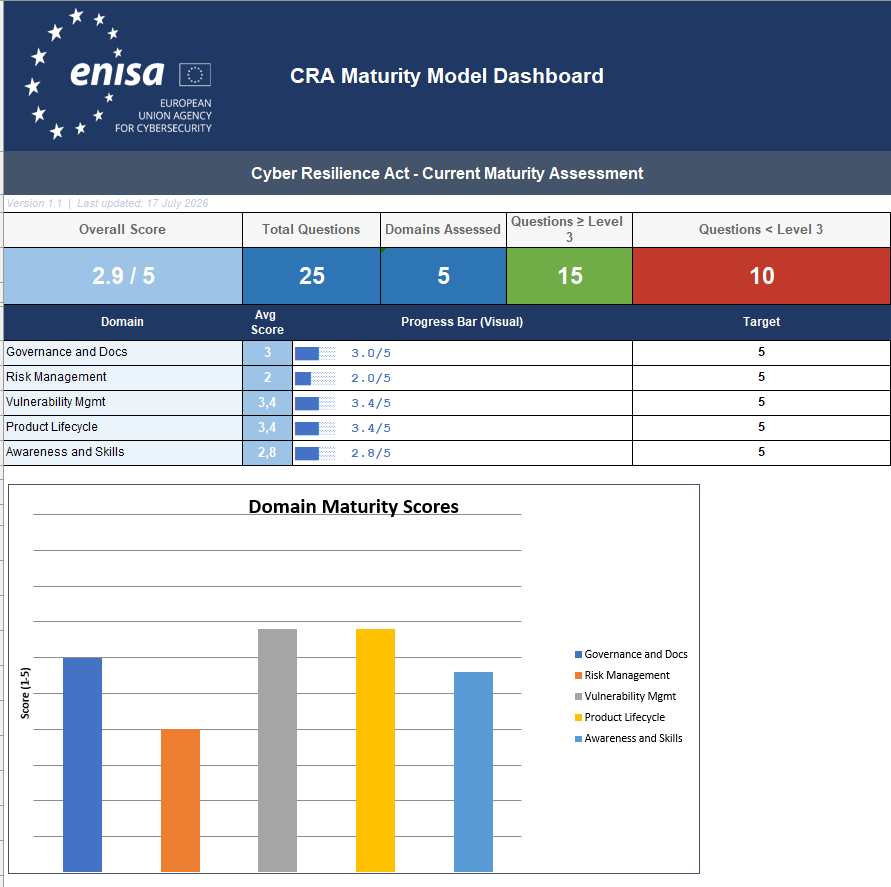
La Dashboard restituisce il quadro d'insieme: punteggio complessivo, media per dominio, numero di domande sopra e sotto il livello 3. È il tipo di vista che si mostra alla direzione senza dover spiegare nulla:
I Cinque Domini, Letti con gli Occhi del CRA
La scelta dei domini non è casuale: ricalca da vicino la struttura degli obblighi del CRA per i fabbricanti. Vediamoli uno per uno, con il mapping verso i requisiti regolamentari che ogni dominio copre di fatto.
1. Governance e Documentazione
Mapping CRA: documentazione tecnica (Annex VII), obblighi del fabbricante (Art. 13), conformity assessment, Market Surveillance AuthorityPolitiche di product security scritte e approvate, ruoli e responsabilità definiti, documentazione tecnica di prodotto mantenuta, processi di riesame. La domanda 1.5 è la più sottovalutata e la più interessante: chiedi a una PMI media chi sia la propria Market Surveillance Authority e quale procedura di valutazione della conformità si applichi ai suoi prodotti, e nella maggior parte dei casi otterrai silenzio. Che ENISA l'abbia messa tra le prime cinque domande dice molto su dove vede i gap.
2. Risk Management, Security by Design e by Default
Mapping CRA: Annex I Parte I, cybersecurity risk assessment (Art. 13), security testingRisk assessment che guidano davvero le decisioni di progettazione, security by design applicata dall'inizio, configurazioni secure by default, testing di sicurezza prima del rilascio, riesame quando il panorama delle minacce cambia. È il dominio che operazionalizza l'Annex I Parte I — e quello dove il nostro threat modeling strutturato diventa lo strumento esecutivo. Nota il dettaglio della domanda 2.4: chiede esplicitamente quanto il testing sia automatizzato, non solo se esista.
3. Vulnerability e Patch Management
Mapping CRA: Annex I Parte II, obblighi di segnalazione (Art. 14), SBOMProcesso per ricevere e tracciare le vulnerabilità segnalate (di fatto: CVD), processo definito per creare, testare e distribuire gli update di sicurezza, SBOM mantenuto e usato per la gestione delle dipendenze, prioritizzazione risk-based, verifica che le fix risolvano davvero. Che lo SBOM compaia in un tool per PMI con la formulazione "maintain and use" è un segnale preciso: generare lo SBOM a fine build e archiviarlo non basta — deve alimentare il processo di vulnerability management.
4. Product Lifecycle Management
Mapping CRA: periodo di supporto, gestione end-of-life, monitoraggio post-marketGestione della sicurezza nella fase operativa, periodi di supporto definiti e comunicati ai clienti, accordi di end-of-life, miglioramento continuo alimentato da incidenti e feedback, monitoraggio dei prodotti in esercizio. È il dominio che le organizzazioni ferme al paradigma "ship and forget" trovano più doloroso — ed è esattamente il paradigma che il CRA rende illegale per i prodotti con elementi digitali.
5. Awareness, Competenze e Skill
Mapping CRA: precondizione operativa di tutti gli obblighiDisponibilità di competenze per progettare e mantenere prodotti sicuri (incluso il ricorso a expertise esterna), formazione per ruolo, cultura del reporting aperto, monitoraggio di advisory e alert esterni, validazione periodica delle competenze. Non corrisponde a un requisito esplicito dell'Annex I, ma è la precondizione di tutti gli altri: nessun processo sopravvive senza persone in grado di eseguirlo.
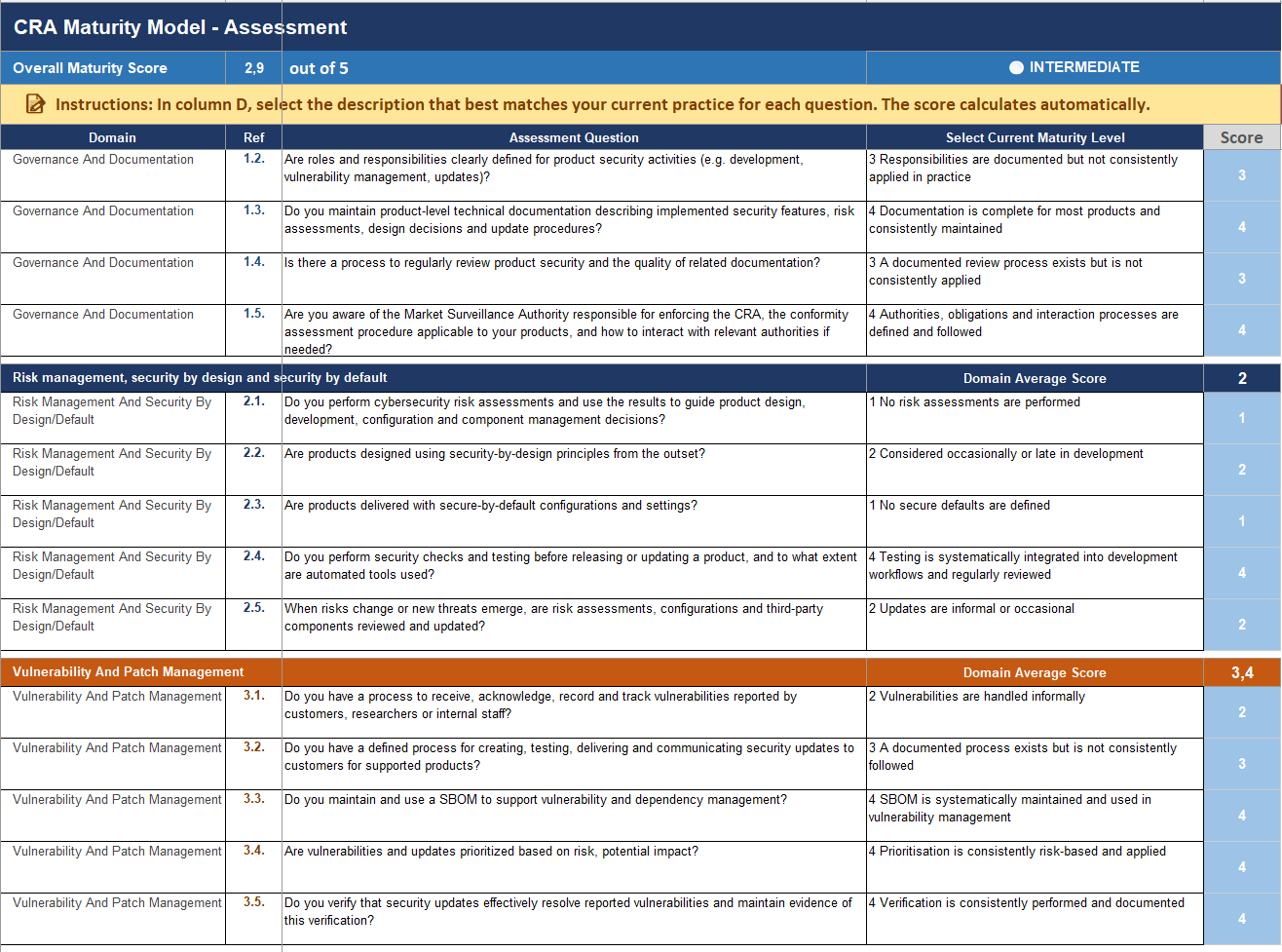
Ogni domanda offre cinque descrizioni tra cui scegliere, una per livello. Le descrizioni sono specifiche per domanda — non un generico "informale/documentato/misurato" fotocopiato ovunque — e questo è ciò che rende il punteggio ripetibile anche quando a compilare sono persone diverse:
La Parte Migliore: La Checklist per Banda di Maturità
Il valore differenziale del tool non è il questionario — è il foglio Checklist. Per ciascuna banda (Basic, Intermediate, Advanced) propone azioni concrete raggruppate per dominio, con una colonna per tracciarne l'avanzamento. Non è un generico "migliorate la governance": sono azioni operative del tipo:
- Basic: "Stabilisci un punto di contatto chiaro per la segnalazione delle vulnerabilità", "Assegna la responsabilità della product security in modo che l'ownership sia chiara", "Genera un inventario dei componenti (SBOM) in formato machine-readable, partendo dai componenti chiave".
- Intermediate: "Assegna un severity rating a ogni vulnerabilità con un approccio consistente", "Definisci timeframe di remediation basati sulla severità", "Testa periodicamente il piano di gestione degli incidenti con walkthrough o tabletop exercise".
- Advanced: "Valuta l'exploitability delle vulnerabilità per prioritizzare le fix", "Traccia indicatori come time-to-detect e time-to-resolve", "Usa i dati di incidenti e monitoraggio per identificare pattern ricorrenti e cause profonde".
La progressione è sensata: prima l'ownership e la visibilità, poi la consistenza, poi la misurazione. È la stessa sequenza che raccomandiamo nei nostri assessment — e vederla codificata in un tool gratuito di un'agenzia europea è un ottimo punto di riferimento da mettere davanti a un management riluttante.
Le istruzioni del tool aggiungono due indicazioni operative che sottoscriviamo in pieno: prioritizza i domini con punteggio sotto 2.5 e scegli un numero ridotto di azioni completabili in 3–6 mesi, invece di aprire venti cantieri contemporaneamente.
Cosa Fa Bene — e Dove Si Ferma
I punti di forza
- È scritto nella lingua del CRA, non della ISO 27001. Le domande parlano di prodotti, update, SBOM, conformity assessment e autorità di vigilanza — non di perimetri aziendali e asset IT. È un maturity model di product security, ed è una rarità nel panorama dei tool per PMI.
- Descrizioni di livello specifiche per domanda. Riducono la soggettività dello scoring e rendono l'assessment ripetibile nel tempo — che è l'unico modo per usarlo come strumento di tracking.
- Le azioni sono proporzionate al destinatario. Gli esempi della checklist ("una nota interna che identifica i contatti per le notifiche", "riunioni trimestrali su incidenti e indicatori") sono realistici per un'azienda da 30 persone. Nessuna richiesta di GRC platform o di un CISO dedicato.
- Attrito zero. Un Excel con dropdown e formule. Si compila in un paio d'ore con le persone giuste nella stanza. Il costo di adozione più basso possibile.
I limiti da tenere presenti
- 25 domande sono uno screening, non una gap analysis. Il tool misura la maturità dei processi, non la conformità del prodotto. L'Annex I Parte I contiene requisiti tecnici puntuali (protezione da accessi non autorizzati, cifratura, minimizzazione della superficie di attacco, resilienza DoS...) che nessuna delle 25 domande verifica singolarmente.
- Nessuna differenziazione per classe di prodotto. Un fabbricante di prodotti "default category" e uno di prodotti Classe II importanti o critici ottengono lo stesso questionario. Ma il percorso di conformity assessment — e la profondità di evidenze richiesta — è radicalmente diverso.
- Self-assessment significa self-bias. La differenza tra "documentato ma non applicato con coerenza" (3) e "applicato con coerenza" (4) è esattamente il punto dove l'auto-valutazione tende all'ottimismo. Fate rispondere chi esegue il lavoro, non chi lo supervisiona.
- Un 5/5 non è una presunzione di conformità. ENISA stessa lo scrive: è un ausilio di auto-verifica, non un sostituto di consulenza legale o di conformity assessment. Nessun punteggio Excel apporrà la marcatura CE al vostro posto.
L'errore da non fare: trattare il punteggio del tool come evidenza di conformità da mostrare a clienti o autorità. Il suo output è una fotografia della maturità dei processi — utile come baseline e come strumento di prioritizzazione, irrilevante come prova di rispetto dell'Annex I. Quella si costruisce con documentazione tecnica, risk assessment di prodotto e testing verificabile.
Come Usarlo Davvero: Il Playbook
- Scaricate il tool e fate la baseline adesso. Dal sito ENISA (ne teniamo anche una copia qui). Due ore, le persone giuste nella stanza: chi sviluppa, chi gestisce le vulnerabilità, chi parla con i clienti.
- Rispondete al ribasso nei casi dubbi. Se state discutendo tra un 3 e un 4, è un 3. L'unico assessment utile è quello onesto: state misurando voi stessi per voi stessi.
- Prendete i domini sotto 2.5 e aprite la Checklist. Selezionate 3–5 azioni completabili in un trimestre, assegnate un owner a ciascuna e mettetele nel backlog come qualsiasi altro lavoro. Un'azione senza owner è una riga in un Excel.
- Ripetete l'assessment ogni trimestre. Il valore del modello non è il punteggio assoluto ma il delta nel tempo. È anche il KPI più leggibile che possiate portare in CdA per giustificare l'investimento in product security.
- Quando i domini salgono sopra il 3, passate alla gap analysis puntuale. A quel punto la domanda smette di essere "abbiamo dei processi?" e diventa "i nostri prodotti rispettano i requisiti essenziali dell'Annex I, requisito per requisito?" — e per quella serve un esercizio diverso, requirement-driven, sul prodotto specifico e sulla sua classificazione.
Il Quadro Complessivo
Il modello ENISA è il miglior punto di partenza gratuito oggi disponibile per una PMI che deve affrontare il CRA e non sa da dove cominciare. Codifica la sequenza corretta (ownership → consistenza → misurazione), parla la lingua giusta e abbassa a zero la barriera di ingresso. Usatelo per quello che è: lo strumento che trasforma "il CRA è un problema enorme e indistinto" in "abbiamo cinque numeri, tre sono bassi, e sappiamo quali dieci azioni fare nel prossimo trimestre".
Quello che il tool non fa — e non pretende di fare — è dirvi se il vostro prodotto è conforme: la classificazione del prodotto, la gap analysis sull'Annex I, la documentazione tecnica per l'Annex VII e la preparazione al conformity assessment restano il lavoro vero. Il team di CRA.tips accompagna i fabbricanti esattamente su questo percorso. Se avete già fatto il self-assessment ENISA e volete capire il passo successivo, partite dalla nostra Gap Analysis qui sotto.
Why This Tool Arrives at the Right Time
The Cyber Resilience Act (Regulation (EU) 2024/2847) has been in force since December 2024. The reporting obligations for actively exploited vulnerabilities and severe incidents (Art. 14) apply from September 2026, and the full set of requirements kicks in on 11 December 2027. If you follow our CRA timeline, you know: the time for "starting to think about it" is over.
The problem is that the CRA's weight does not fall evenly. Large companies have product security, regulatory affairs, and conformity assessment teams. The SMEs manufacturing products with digital elements — the vast majority of Europe's manufacturing fabric — often don't have a single person dedicated to security. For them, reading Annex I and figuring out where to start is an exercise in frustration.
That is exactly the gap ENISA is trying to close with the SME Cyber Resilience Maturity Assessment Model: a maturity model designed for micro, small and medium-sized enterprises, shipped with an Excel tool (CRA Maturity Model Tool, v1.1) that turns the model into a self-assessment you can complete in a couple of hours. No platform, no registration, no cost: an .xlsx with formulas and dropdowns. And for the audience it targets, that is the right call.
In short: 25 questions, 5 domains, a 1–5 maturity scale, an automatic dashboard, and a checklist of suggested actions per maturity band. Primary audience: manufacturers subject to the CRA. Also useful for integrators and service providers who want to structure their product security practices.
The Model's Architecture: 5 Domains, 25 Questions, a 1–5 Scale
The tool is organized in five sheets: Instructions, Dashboard, Questionnaire, Pivots, and Checklist. The core is the Questionnaire: 25 questions across 5 domains, 5 questions each. For every question you pick from a dropdown the description that best matches your current practice, and the score computes itself.
The scale is the classic CMMI-style maturity ladder, adapted with concrete descriptions per question:
- Initial — the practice does not exist or is entirely absent.
- Basic — it exists informally, occasionally, undocumented.
- Developing — it is documented but not consistently applied.
- Managed — it is consistently applied and reviewed.
- Optimised — it is measured, tracked, and continuously improved.
The overall score places the organization in one of three maturity bands:
The Dashboard delivers the big picture: overall score, per-domain averages, and the number of questions above and below level 3. It is the kind of view you can put in front of management without explaining anything:
The Five Domains, Read Through a CRA Lens
The choice of domains is not accidental: it closely mirrors the structure of the CRA's manufacturer obligations. Let's go through them one by one, with the mapping to the regulatory requirements each domain effectively covers.
1. Governance and Documentation
CRA mapping: technical documentation (Annex VII), manufacturer obligations (Art. 13), conformity assessment, Market Surveillance AuthorityWritten and approved product security policies, defined roles and responsibilities, maintained product-level technical documentation, review processes. Question 1.5 is the most underrated and the most interesting: ask an average SME who their Market Surveillance Authority is and which conformity assessment procedure applies to their products, and most of the time you will get silence. That ENISA put it among the first five questions says a lot about where it sees the gaps.
2. Risk Management, Security by Design and by Default
CRA mapping: Annex I Part I, cybersecurity risk assessment (Art. 13), security testingRisk assessments that actually drive design decisions, security by design applied from the outset, secure-by-default configurations, security testing before release, review when the threat landscape shifts. This is the domain that operationalizes Annex I Part I — and where structured threat modeling becomes the executive tool. Note the detail in question 2.4: it explicitly asks how automated your testing is, not just whether it exists.
3. Vulnerability and Patch Management
CRA mapping: Annex I Part II, reporting obligations (Art. 14), SBOMA process to receive and track reported vulnerabilities (effectively: CVD), a defined process to create, test and deliver security updates, an SBOM that is maintained and used for dependency management, risk-based prioritization, verification that fixes actually fix. The phrasing "maintain and use" for the SBOM in an SME tool is a precise signal: generating an SBOM at the end of the build and archiving it is not enough — it has to feed the vulnerability management process.
4. Product Lifecycle Management
CRA mapping: support period, end-of-life handling, post-market monitoringManaging security during the operational phase, defined support periods communicated to customers, end-of-life arrangements, continuous improvement fed by incidents and customer input, monitoring of products in operation. This is the domain that organizations stuck in the "ship and forget" paradigm find most painful — and it is precisely the paradigm the CRA makes illegal for products with digital elements.
5. Awareness, Competence and Skills
CRA mapping: operational precondition for every other obligationAvailability of skills to design and maintain secure products (including external expertise), role-appropriate training, an open-reporting culture, monitoring of external advisories and alerts, periodic validation of competence. It doesn't map to an explicit Annex I requirement, but it is the precondition for all the others: no process survives without people capable of executing it.
Each question offers five descriptions to pick from, one per level. The descriptions are question-specific — not a generic "informal/documented/measured" photocopied everywhere — and that is what makes the score repeatable even when different people fill it in:
The Best Part: The Band-Based Action Checklist
The tool's differentiating value is not the questionnaire — it is the Checklist sheet. For each band (Basic, Intermediate, Advanced) it proposes concrete actions grouped by domain, with a column to track progress. This is not a generic "improve your governance": these are operational actions like:
- Basic: "Establish a clear contact point for reporting vulnerabilities", "Assign responsibility for product security activities so that ownership is clear", "Generate a component inventory (SBOM) in a machine-readable format, starting with key components".
- Intermediate: "Assign a severity rating to each vulnerability using a consistent approach", "Set remediation timeframes based on severity", "Test the incident handling plan periodically with walkthroughs or tabletop exercises".
- Advanced: "Assess the exploitability of vulnerabilities to prioritize fixes", "Track indicators such as time-to-detect and time-to-resolve", "Use incident and monitoring data to identify recurring patterns and root causes".
The progression is sound: ownership and visibility first, then consistency, then measurement. It is the same sequence we recommend in our assessments — and seeing it codified in a free tool from an EU agency is an excellent reference to put in front of reluctant management.
The tool's instructions add two operational rules we fully endorse: prioritize domains scoring below 2.5 and pick a small number of actions you can complete in 3–6 months, instead of opening twenty workstreams at once.
What It Does Well — and Where It Stops
The strengths
- It speaks the CRA's language, not ISO 27001's. The questions talk about products, updates, SBOMs, conformity assessment, and surveillance authorities — not corporate perimeters and IT assets. It is a product security maturity model, which is a rarity in the SME tooling landscape.
- Question-specific level descriptions. They reduce scoring subjectivity and make the assessment repeatable over time — which is the only way to use it as a tracking instrument.
- The actions are proportionate to the audience. The checklist examples ("a short internal note identifying notification contacts", "quarterly meetings covering incidents and key indicators") are realistic for a 30-person company. No GRC platform or dedicated CISO required.
- Zero friction. An Excel with dropdowns and formulas. You complete it in a couple of hours with the right people in the room. The lowest possible adoption cost.
The limits to keep in mind
- 25 questions are a screening, not a gap analysis. The tool measures process maturity, not product conformity. Annex I Part I contains precise technical requirements (protection against unauthorized access, encryption, attack surface minimization, DoS resilience...) that none of the 25 questions verifies individually.
- No differentiation by product class. A manufacturer of default-category products and one making important Class II or critical products get the same questionnaire. But the conformity assessment route — and the depth of evidence required — is radically different.
- Self-assessment means self-bias. The difference between "documented but not consistently applied" (3) and "consistently applied" (4) is exactly where self-scoring drifts optimistic. Have the people who do the work answer, not the people who supervise it.
- A 5/5 is not a presumption of conformity. ENISA says it itself: this is a self-check aid, not a substitute for legal or conformity advice. No Excel score will affix the CE marking for you.
The mistake to avoid: treating the tool's score as conformity evidence to show customers or authorities. Its output is a snapshot of process maturity — useful as a baseline and prioritization instrument, irrelevant as proof of Annex I compliance. That is built with technical documentation, product-level risk assessments, and verifiable testing.
How to Actually Use It: The Playbook
- Download the tool and baseline now. From the ENISA site (we also keep a copy here). Two hours, the right people in the room: whoever develops, whoever handles vulnerabilities, whoever talks to customers.
- Round down when in doubt. If you are debating between a 3 and a 4, it is a 3. The only useful assessment is an honest one: you are measuring yourselves for yourselves.
- Take the domains below 2.5 and open the Checklist. Pick 3–5 actions completable within a quarter, assign an owner to each, and put them in the backlog like any other work. An action without an owner is a row in a spreadsheet.
- Re-run the assessment every quarter. The model's value is not the absolute score but the delta over time. It is also the most readable KPI you can bring to the board to justify product security investment.
- Once domains climb above 3, move to a requirement-level gap analysis. At that point the question stops being "do we have processes?" and becomes "do our products meet the essential requirements of Annex I, requirement by requirement?" — and that takes a different, requirement-driven exercise on the specific product and its classification.
The Bottom Line
The ENISA model is the best free starting point available today for an SME facing the CRA without knowing where to begin. It codifies the right sequence (ownership → consistency → measurement), speaks the right language, and drops the entry barrier to zero. Use it for what it is: the instrument that turns "the CRA is a huge, shapeless problem" into "we have five numbers, three are low, and we know which ten actions to take next quarter".
What the tool does not do — and does not claim to do — is tell you whether your product is compliant: product classification, the Annex I gap analysis, the Annex VII technical documentation, and conformity assessment preparation remain the real work. The CRA.tips team supports manufacturers on exactly that path. If you have already run the ENISA self-assessment and want to understand the next step, start with our Gap Analysis below.